
Zerto autoscaling, up and down!
First of all I am going to apologise for the terrible title, I don’t know what came over me. In this blog i am going to run you through how Zerto can scale up and down with your environment to make sure Zerto is always right sized for the amount of workloads you are running.
Lets look at the architecture of Zerto to begin with.

We can see we have 2 major components the Zerto Virtual Manager (ZVM) and the Virtual Replication Appliance (VRA)
The ZVM is the management component of the Zerto Platform so is not in the data path – as long as this is sized sensible in the first instance with an external DB we shouldn’t need to scale this up at all
The VRA is the data mover, these are the appliances that sit on each and every hypervisor host in the environment, they are in the data path and these are the appliances that actually carry out the continuous data protection that Zerto is famous for.
As mentioned earlier each Hypervisor host in the on premises environment has a VRA installed upon it so if your environment has 500 VM’s with 12 Hosts, therefore you have 12 VRA’s to support Zerto replication and Long Term Retention. Now imagine that you scale your environment to 1000 VM’s, you will need another 12 hosts to support those VM’s running and therefore Zerto will have another 12 VRA’s added to the environment , and as the title of the blog suggested, this can happen automatically when you add a host the a cluster – all you need to to is enable a couple of settings in your ZVM.
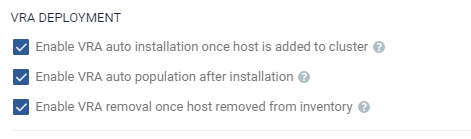
These settings allow Zerto to automatically deploy a VRA when a host is added to a cluster and also automatically remove the VRA when a host is removed from a cluster meaning that these setting will allow Zerto to automatically scale up AND down with your environment.
combine the above settings with these:
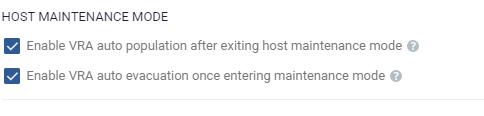
This now allows hosts to be added and removed without the need to manually move workloads or journal/replica disks and for the VRA to be automatically added and removed with.
When using auto evacuate and auto populate please note that this is not an instant process and can take a few minutes to complete – I’m the most impatient person so I found out the hard way that i just need to leave it and wait a few more moments.
Hope you find this helpful
Please share and comment
Cheers
Chris

 VChrisRogers