
No Sync Feature
I’m going to write a short series on Newly released Features hat make up the Zerto 9.5 release
Once I have experienced the new features a little more I will do a second series deep diving some of the new features and functionality inside Zerto 9.5
As a long time Zerto user I am going to show some of the features that may not be headline items but will make a difference to Zerto users everywhere!
Exclude Disk from Replication
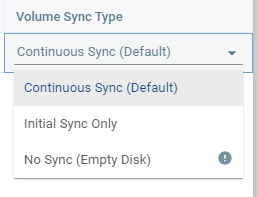
Previously inside Zerto, there was a concept of a “temp” disk, this would only sync once and then not participate in CDP after the initial sync was complete, this was great however if your Temp disk was 2TB in size not only did the initial sync take extra time to complete but also took up storage space at the DR site. With Zerto 9.5 users now have the option to select one of three options for each disk attached to a VM being replicated by Zerto
- Continuous Sync (Default) – this will be the most popular options as it means all data on the disk will be continuously replicated
- Initial Sync Only – Disks will only undergo an initial sync and then opt out of CDP after.
- No Sync – this option is brand new and allows disks to be completely removed from all sync activities including initial sync.
The No Sync option will add flexibility and agility to people Zerto deployments and will no longer have initial sync times longer than necessary and no longer be storing data they never intend to use for DR or Ransomware Recovery. upon recovery an empty disk will be attached to the VM of the correct size.
Please look out for the next post in this series which will cover another new feature in Zerto 9.5
Thanks
Chris

 VChrisRogers