What is Zerto Backup for SaaS

The title is pretty self explanatory really, I’m going to run through what Zerto Backup for SaaS is, how it works and some of the advantages I see of using it.

The What?

Well the naming of the product couldn’t be more explanatory really, it is Zerto’s offering for backing up your SaaS Data, very simple and easy to understand, no codename or fancy marketing titles, simply put backup your SaaS data with Zerto!

The Why?

As most of use use SaaS applications on a daily basis in our work environments and personal lives, it easy to forget that some of our most critical data sits inside of these SaaS applications. But surely Microsoft are backing up my data for me inside of my company email? The short answer… No,  Microsoft advises, “We recommend that you regularly backup Your Content and Data that you store on the Services or store using Third-Party Apps and Services”. This is also true of Gartner and Forrester, aswell as data regulatory laws such as GDPR. Having an independant copy of your data outside of the provider can give many benefits, but data security and data availability are the two main reasons to choose an independant 3rd party provider.

The How?

Zerto Backup for SaaS is powered by KeepIT, a leading provider in SaaS data protection therefore Zerto automatically becomes a prominent figure in this space by adopting industry leading technology as its foundation. Zerto Backup for SaaS offers users a simple way to backup, store and protect SaaS data, utilising a cloud to cloud model,

Zerto backup for SaaS stores data in the only cloud that is purpose built, designed and dedicated to SaaS data protection. This means storing a copy outside of any hyperscale public cloud such as AWS or Azure, which automatically guarantees that your live data is not sat in the same cloud as your Backup data.

Being SaaS to SaaS data protection offers many advantages, you dont need to run any additional infrastructure or manage any capacity or storage outside of the Zerto Backup for SaaS offering, this means complexity is minimal, capacity planning is non existent, storage and egress charges do not apply, and no longer to do organisations needs ot balance cost, retention and compliance, all 3 can be kept in check.

The Wow

Here are some of the key major benefits to using Zerto backup For SaaS.

  • Unlimited Retentions – store as much data for as long as you want included in a per seat price
  • Simple Pricing Model – Simply pay per user per month, no additonal costs or hidden fees such as storage, infrastructure or egress
  • Preview Everything – See what your planning to restore before you restore it, saving time and copies of data restored that are not right.
  • Comprehensive Coverage – One of the deepest and widest protection on the market for SaaS data
    • Micrososft 365
    • Salesforce
    • Google Workspace
    • Microsoft Dynamics 365
    • Azure Active Directory (Free)
    • ZenDesk

Summary

I know this is a very high level overview and some thoughts on the overall product itself, but I am going to be sharing more and more on Zerto Backup for SaaS in the future so keep an eye out for more detailed content coming soon.
Introducing Zerto 9.5 – Part 3

Immutability and Offsite Repository Additions

Azure Storage Account Immutability

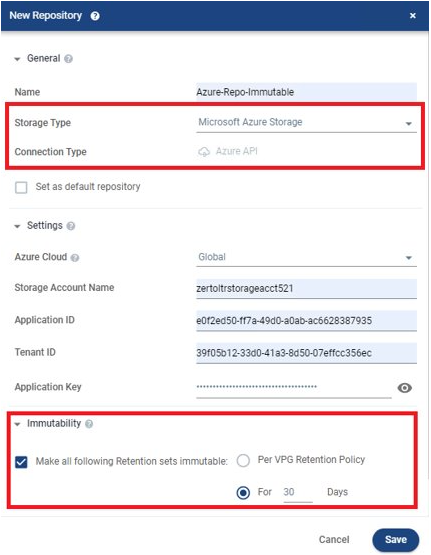
With the astronomic rise of ransomware attacks, organizations are being even more wary about where and how they store copies of their data for recovery purposes, as many of you may know already Zerto supports a wide variety of storage platforms for its offsite repository or “Long Term Retention” feature, these include Amazon S3, Azure Storage Accounts Purpose Built backup targets such as HPE Storonce, Exagrid etc, NFS & SMB and S3 compatible storage such as Cloudian, this gives customer ultimate flexibility when choosing a suitable repository for their needs. up until recently Amazon S3 is the only supported place for immutable copies to be stored, in an updated to version 9.0 Zerto released the support for S3 Compatible systems to also be able to use the immutable feature inside of Zerto, this allows to organisations to use on-premises s3 repositories aswell as cloud based ones with immutability, and now as of version 9.5, Microsoft Azure Storage Accounts are now supported for immutability aswell, this growing list shows the dedication Zerto has to offering true choice and flexibility when it comes to choosing not only production storage, hypervisors or even whole cloud environments but also where you choose to store immutable copies of the your data aswell.

I think this is huge news, Azure is one of if not the biggest cloud provider in the world so being able to support customers wanting to store data in an immutable format in Azure can only be a good thing.

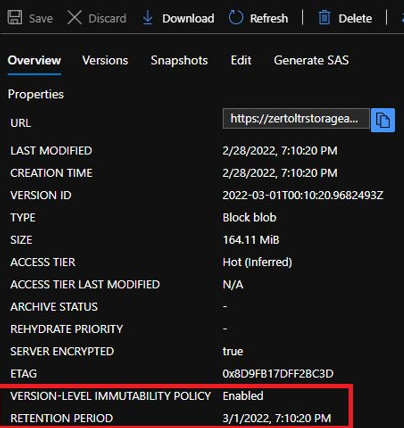
Zerto leverages the “versioning” options inside of the Azure Storage Accounts to ensure immutable copies cannot be deleted or tampered with once stored, Zerto then creates its own containers of data and metadata in a unique way for Zerto to understand the immutability function.

users can verify if the files are immutable in the Azure portal, by browsing the storage and looking for the field “Version-level Immutable Policy” – this will show either enabled or disabled.

More from Zerto 9.5 to come soon!

Thanks for Reading

Chris

Introducing Zerto 9.5 – Part 2

Independant Scratch Journal Settings

Thanks for reading the second part of this blog all about Zerto 9.5, in this post in going to look at another great feature Zerto has released, the ability to split out journal volumes and scratch volumes settings.

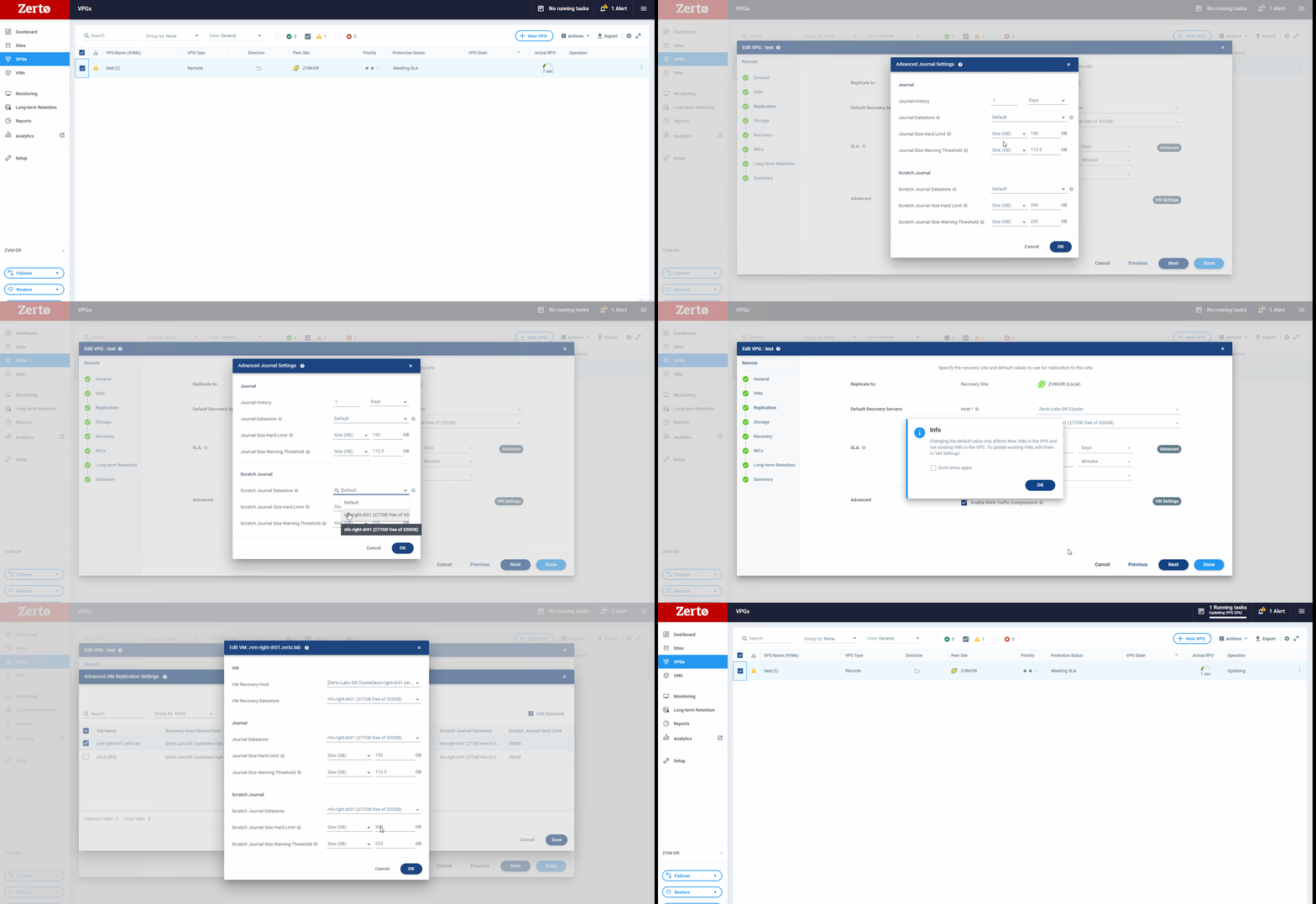
So for people who are newer to Zerto, what is a scratch volume and what does it do? Well a scratch volume is used inside of the Zerto solution to provide a temporary place for data to be written during operations such as a failover test, allowing users to perform any type of validation on their instantly available copy that zerto has spun up. The scratch volume is used in most of Zerto’s recovery operations, it allows for simple rollbacks from live failovers or move operations by ensuring. until a failover or move is committed any writes made are written to the scratch volume and not overwriting production data, if a rollback is triggered then the scratch volume simply gets removed and Zerto’s automation and orchestration kicks in to clean up and rollback recovery as if nothing ever happened.

So why is separating these settings good news? well historically, the scratch volume settings were directly tied to the journal volume settings, so parameters such as datastore location and maximum size were identical to that of the journal volume, this means that extra planning had to be made during extended failover tests or to make sure the underlying data store had enough free capacity for the scratch volume to write into.

Now there is separation between these two objects inside of the Zerto solution, users are now able to specify a different datastore – therefore a potentially different class or type of storage SSD over HDD for example, and also specify different hard limits to that of the journal, this is incredibly useful if a user wants to run a failover test for an extended period this allows them to create a scratch volume far larger than before to extend the period of time a failover test can last.

This setting is located inside the VPG settings so can be customised on a per VPG basis and on a per VM basis giving an mazing amount of flexibility.

That is all from Part 2, Keep an eye out for the next instalment which will be along soon

Thanks for Reading

Chris

Introducing Zerto 9.5 – Part 1

No Sync Feature

I’m going to write a short series on Newly released Features hat make up the Zerto 9.5 release

Once I have experienced the new features a little more I will do a second series deep diving some of the new features and functionality inside Zerto 9.5

As a long time Zerto user I am going to show some of the features that may not be headline items but will make a difference to Zerto users everywhere!

Exclude Disk from Replication

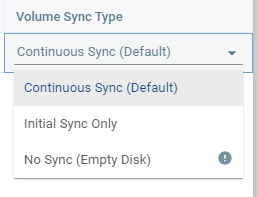
Previously inside Zerto, there was a concept of a “temp” disk, this would only sync once and then not participate in CDP after the initial sync was complete, this was great however if your Temp disk was 2TB in size not only did the initial sync take extra time to complete but also took up storage space at the DR site. With Zerto 9.5 users now have the option to select one of three options for each disk attached to a VM being replicated by Zerto

  • Continuous Sync (Default) – this will be the most popular options as it means all data on the disk will be continuously replicated
  • Initial Sync Only – Disks will only undergo an initial sync and then opt out of CDP after.
  • No Sync – this option is brand new and allows disks to be completely removed from all sync activities including initial sync.

The No Sync option will add flexibility and agility to people Zerto deployments and will no longer have initial sync times longer than necessary and no longer be storing data they never intend to use for DR or Ransomware Recovery. upon recovery an empty disk will be attached to the VM of the correct size.

Please look out for the next post in this series which will cover another new feature in Zerto 9.5

Thanks

Chris

Zerto Launches Instructor Led Training!

For the first time in Zerto’s history customers, partners and prospects are now able to gain valuable expertise and knowledge in the Zerto solution from a qualified instructor.

Managing Zerto: Setup,Protection, and Recovery is the title of the course which is aimed at all experience levels looking to solidify their zerto knowledge to makes sure they are using Zerto’s powerful solution to the best of its ability and solving for all use cases.

During the class there are labs that students will complete to solidify their conceptual knowledge they will have learned from the instructor and students can even show the value of Zerto by recovering from ransomware within minutes, to seconds before an attack.

To find out more visit: https://education.hpe.com/us/en/training/portfolio/zerto.html

DR at Scale in AWS – The Zerto Way

Last week i had the pleasure of attending AWS Re-Invent in Vegas, I spoke to a lot of people and it reminded me of how much I have missed these type of events recently!

I had the pleasure of speaking to some of Zerto’s customers who are already achieving their DR or migration goals utilizing Zerto and AWS. So Logically the NExt question was – what’s next from Zerto? i spent most of my week talking about the new product announcement – Zerto In-Cloud for AWS – Disaster Recovery at Scale for EC2 instances!

Lets take a look at some of the key highlights before my next blog which will be a deeper dive.

  • Scalable DR – No agents to manage ! i think this is huge because everyone know as you scale managing agents across 1000 EC2 instances is no easy task
  • Purpose built for AWS – A complete re-design and new In-Cloud Appliance makes Zerto In-Cloud incredibly efficient and cost effective
  • Cross Region, Availability Zone and Account – Giving customers ultimate choice and flexibility in their DR – Not just pre-approved paired zones!
  • Configurable RPO – This is a first for Zerto allowing customer to choose the desired RPO on a VPG by VPG basis.
  • Advanced Analytics – From day 1 Zerto In-Cloud will show all analytical data in its SaaS platform Zerto Analytics for greater visibility and control over your entire hybrid/public cloud estate

That’s is all i can think of off the top of my head, i will be doing a follow up to this to go over some of the technical parts in more detail so keep an eye out for that one in the near future.

Feel free to get in touch if you would like to know more!

Cheers

Chris

In, out, in, out, Zerto it all about!

Zerto autoscaling, up and down!

First of all I am going to apologise for the terrible title, I don’t know what came over me. In this blog i am going to run you through how Zerto can scale up and down with your environment to make sure Zerto is always right sized for the amount of workloads you are running.

Lets look at the architecture of Zerto to begin with.

We can see we have 2 major components the Zerto Virtual Manager (ZVM) and the Virtual Replication Appliance (VRA)

The ZVM is the management component of the Zerto Platform so is not in the data path – as long as this is sized sensible in the first instance with an external DB we shouldn’t need to scale this up at all

The VRA is the data mover, these are the appliances that sit on each and every hypervisor host in the environment, they are in the data path and these are the appliances that actually carry out the continuous data protection that Zerto is famous for.

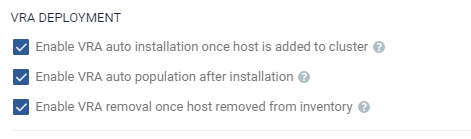
As mentioned earlier each Hypervisor host in the on premises environment has a VRA installed upon it so if your environment has 500 VM’s with 12 Hosts, therefore you have 12 VRA’s to support Zerto replication and Long Term Retention. Now imagine that you scale your environment to 1000 VM’s, you will need another 12 hosts to support those VM’s running and therefore Zerto will have another 12 VRA’s added to the environment , and as the title of the blog suggested, this can happen automatically when you add a host the a cluster – all you need to to is enable a couple of settings in your ZVM.

These settings allow Zerto to automatically deploy a VRA when a host is added to a cluster and also automatically remove the VRA when a host is removed from a cluster meaning that these setting will allow Zerto to automatically scale up AND down with your environment.

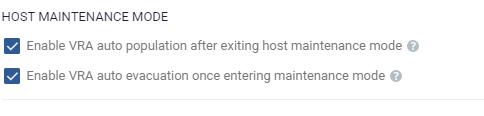
combine the above settings with these:

This now allows hosts to be added and removed without the need to manually move workloads or journal/replica disks and for the VRA to be automatically added and removed with.

When using auto evacuate and auto populate please note that this is not an instant process and can take a few minutes to complete – I’m the most impatient person so I found out the hard way that i just need to leave it and wait a few more moments.

Hope you find this helpful

Please share and comment

Cheers

Chris

Zerto 9.0u2 – MSP & API Improvements

Hey everyone just a quick post today about the new Zerto version that has been released recently, they’re is a couple of things I want to point out that I think are worth noting!

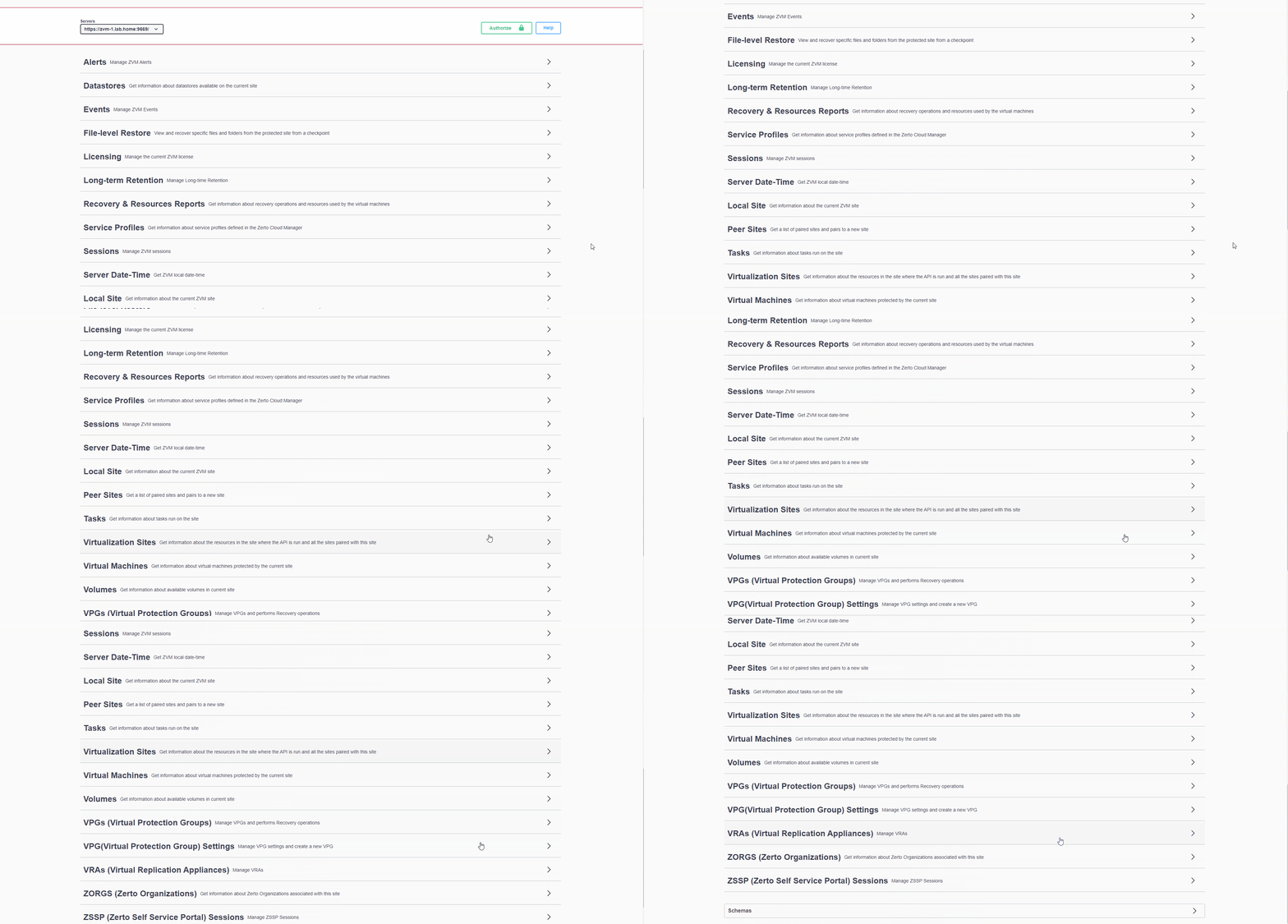
Swagger API for the ZVM

now anyone who loves a little bit of automation will love the API , i actually found the Zerto API one of the more friendly API’s to use however Zerto have just made it a tonne easier! adding a swagger API allows to API Commands to be run from the web to try them out adn too help with constructing their own api calls for automation purposes.

As you can see above the API covers everything that you would expect inside the ZVM.

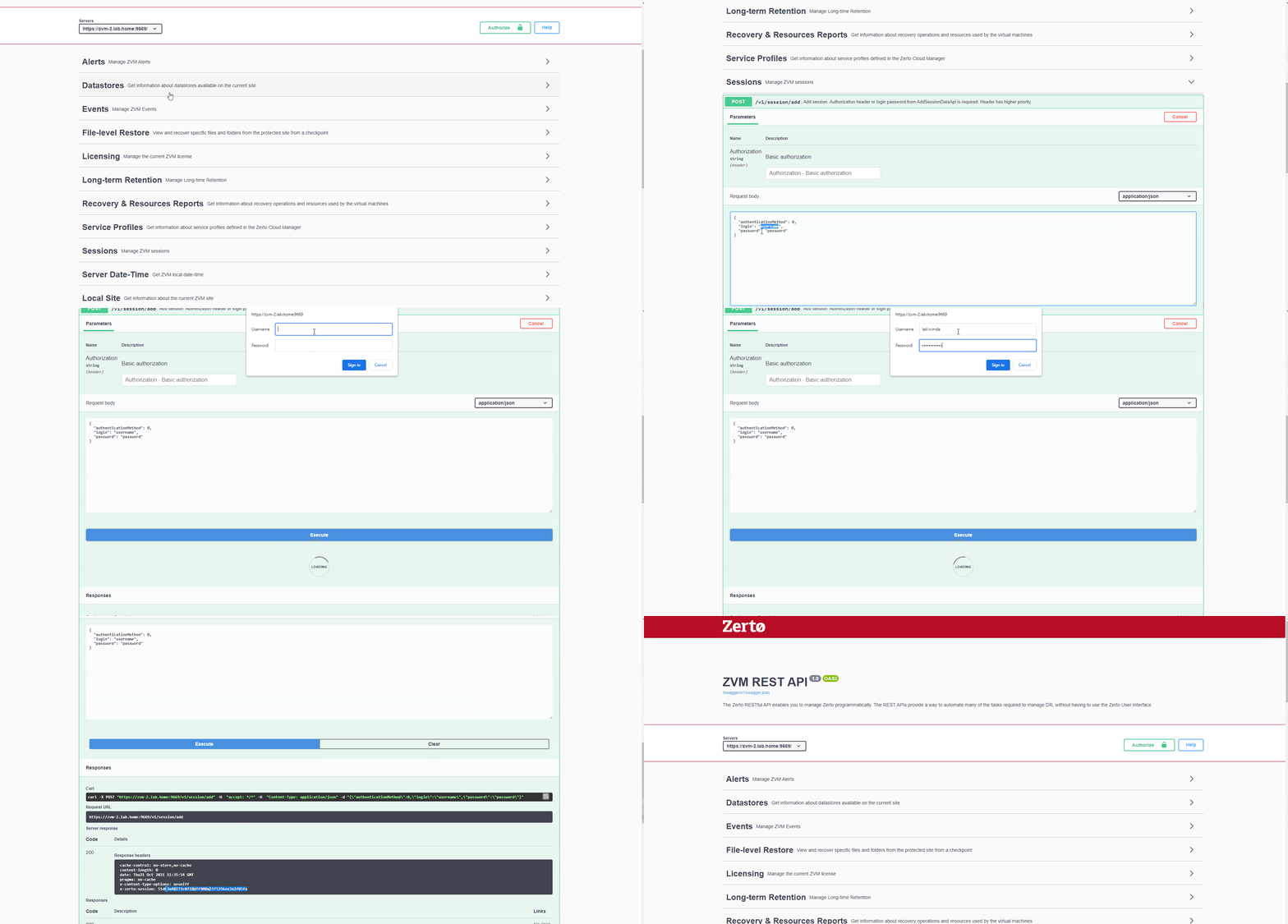
i’ll show you how to authenticate first:

Now we will use the Auth token we created to run an API call

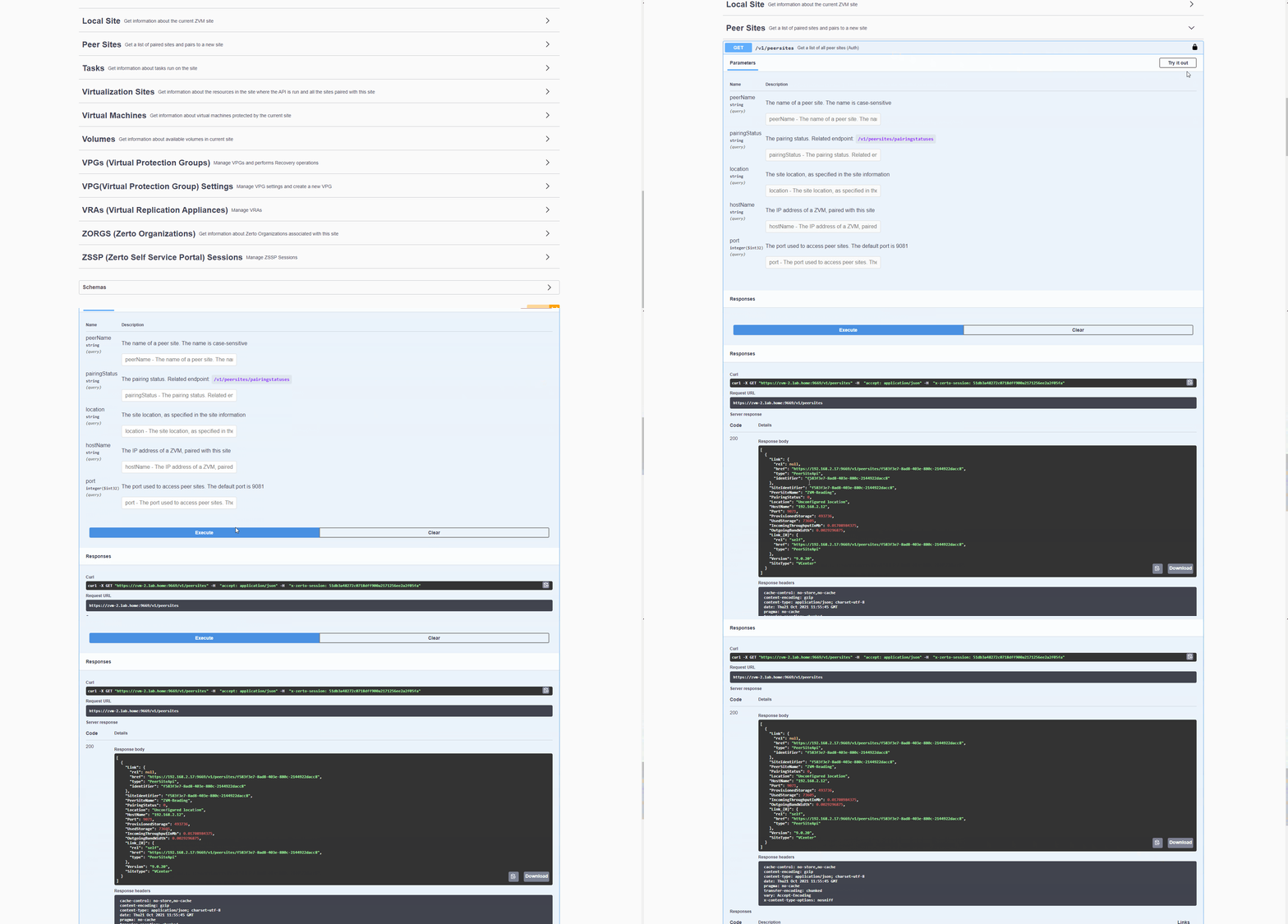
Lets run the Peer Sites API and see the response and information we get back from calling the API.

It’s incredibly easy to run and gain lot’s of valuable information from it.

MSP Improvements

As you all know MSP and multi-tenancy is where my zerto career started so is got a place firmly in my heart, in this release we have seen some improvements for our MSP community.

VMware Cloud Director (VCD) reflection collection improvement

The VCD reflection collection mechanism was optimized to enhance performance and prevent CPU and
networking spikes in machines belonging to large-scale VCD environments.
The VCD CPU and the internal DB load are reduced due to:

  • Limiting parallel calls to VCD
  • Actively monitoring the calls to VCD to achieve a much more efficient process
  • Optimizing ZVM queries to VCD

Hopefully these improvement can make Zerto more efficient in processing its data from VCD and make running at extreme scale easier.

I will be doing a follow up blog for some more API tasks that I think people may want to use

Thanks for reading

Chris

Zerto Long Term Retention with HPE Cloud Volumes

Hi All, today I am going to attempt to set up HPE Cloud Volumes as a repo for Zerto to store its Long Term Retention data. this is something completely new to me so hopefully we can all learn something on the way.

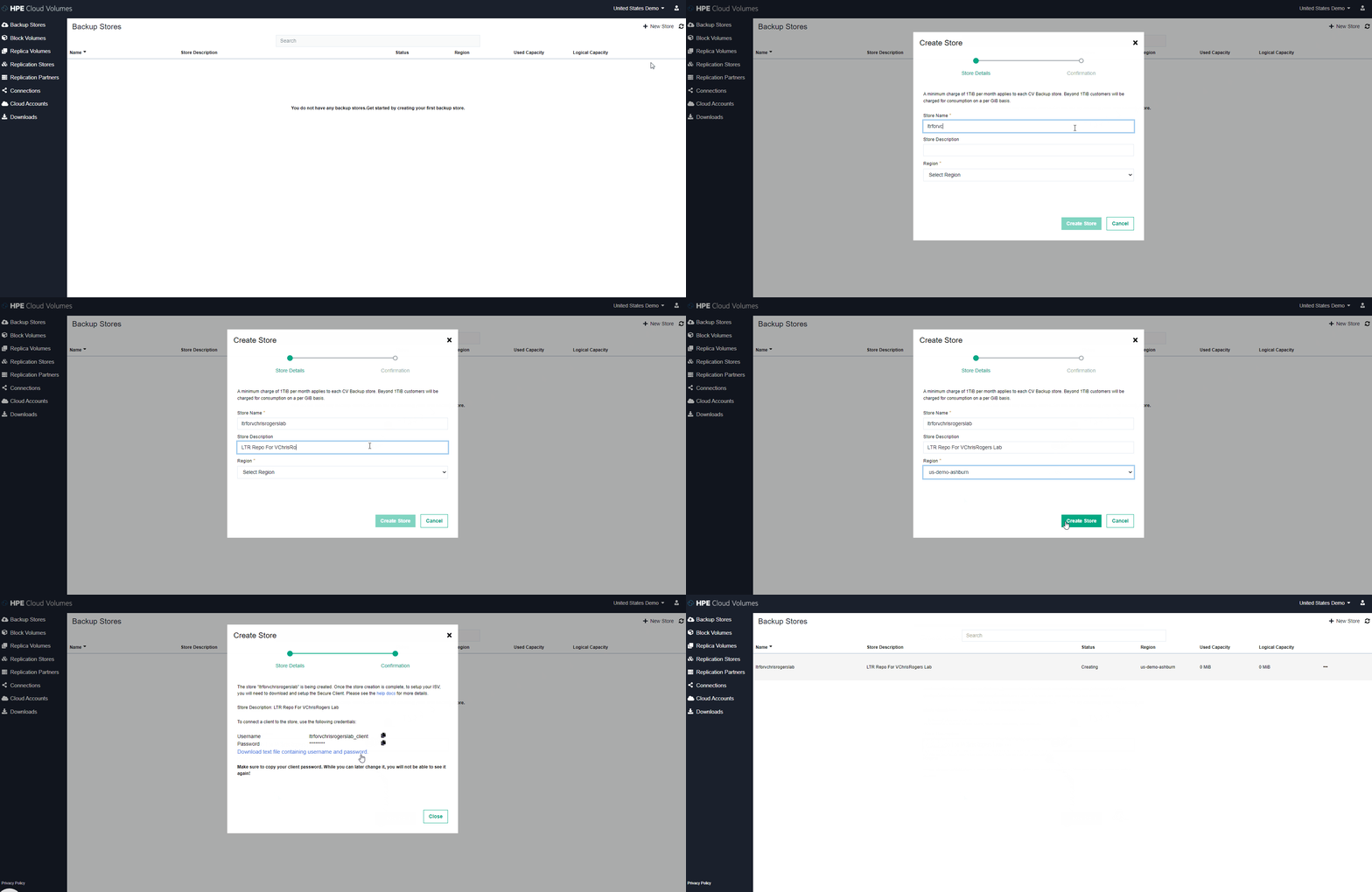
so let’s look at the steps needed to create the backup store and connect it to Zerto.

  1. Create backup store inside HPE Cloud Volumes

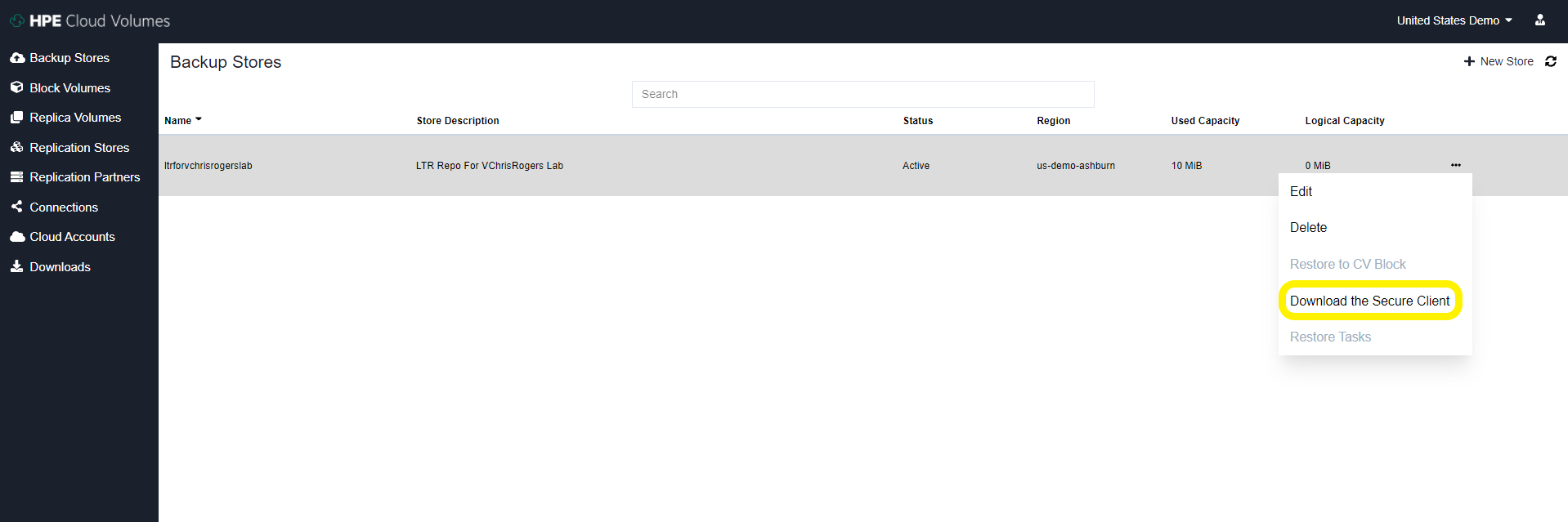
2. download the secure client from the options tab on the store we just created

3. Apply config to secure client server On-Prem – I used the official documentation from HPE to do this : https://docs.cloudvolumes.hpe.com/help/kts1584136344568/

I deployed an Ubuntu 20 VM and with my rather limited Linux skills I did manage to configure the secure client service correctly and get it running.

I did have a couple of issues along the way, most likely the issue stemmed from me not reading things properly (I think we have all been there) issues I had are: In the secure_client_config.yaml file I had to change the paths to absolute paths for the files and i have to change the ownership of the files to the user i was running thes service as, again probably just my poor linux knowledge shining through

# Certificate path for CDS signing authority
ca: /opt/cloudvolumes/ca.crt

# Client certificate issued by CDS to customer
cert: /opt/cloudvolumes/client.crt

# Client key issued by CDS to customer
key: /opt/cloudvolumes/client.key

# CBS public endpoint address
target1: demo-us-ashburn-1.cloudvolumes.hpe.com:9387
target2: demo-us-ashburn-1.cloudvolumes.hpe.com:9388

# Local ports to listen upon
source1: 0.0.0.0:9387
source2: 0.0.0.0:9388

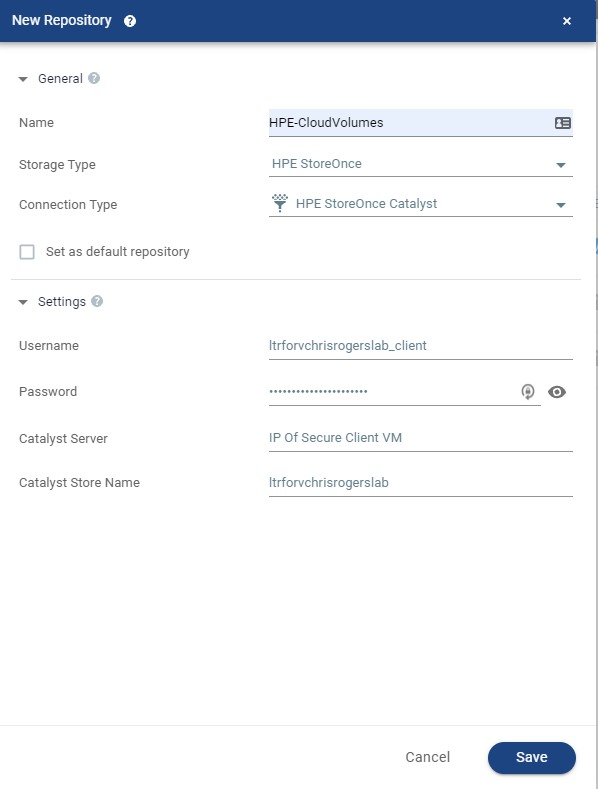
4. Once this service has started and all look good inside the VM you can now add the Repo to Zerto in the exact same way that you would add a HPE Catalyst Store from a StoreOnce Appliance – The credentials used are the ones you downloaded from the HPE Cloud Volumes page earlier on.

5. Once this is added you will see it appear as a Catalyst store inside the Zerto UI and now this is enabled for Zerto to store LTR copies on

Now all we have to do is configure a VPG to utilise LTR and send some snapshot free backups to the cloud!

I know this wasn’t particularly in depth but honestly it’s super easy to configure as are most things within Zerto.

This is a great use case for getting your data offsite but not having to pay egress charges etc – another way Zerto and HPE work amazingly well together.

Thanks for reading everyone

feel free to comment and share

Cheers

Chris

Long Term Retention with HPE StoreOnce

Hey All

I just wanted to run people by what I am using for my Long Term Retention Repo in my home lab.

I am using the HPE StoreOnce Virtual Appliance to store my long term retention copies from Zerto on – simply this is a an OVF appliance that i’ve deployed into my environment and have attached some local disks to for capacity – ive got around 1TB of usable space to consume.

the reason why I chose this appliance instead of a Generic NFS/SMB or S3 compatible is that Zerto has tight integration with HPE Catalyst API, this actually runs inside of each and every VRA Zerto deploys. So what does this mean, well…

  • We can add Catalyst Stores natively from the Zerto UI
  • Zerto will change the data structure of its LTR Copies to make sure its is perfectly suited to HPE Catalyst Store
  • Source Side Deduplication via the Catalyst API
  • Automatically optimize multiple streams without overloading StoreOnce
  • Automatically manage the repository lifecycle and perform garbage collection

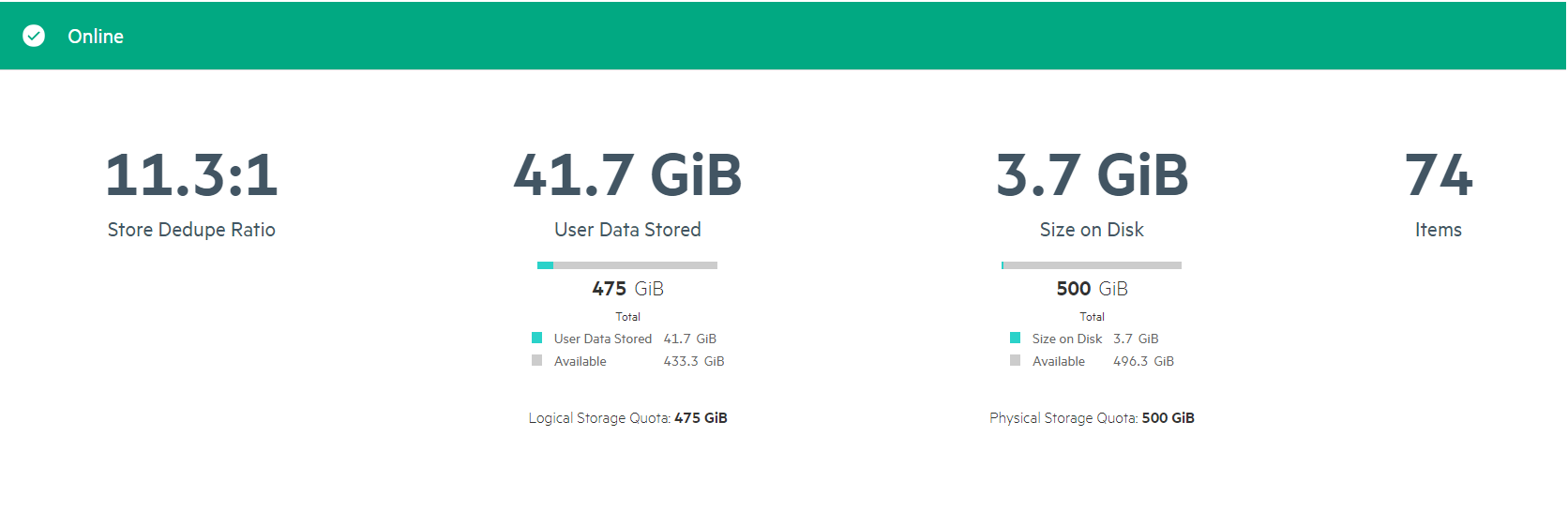
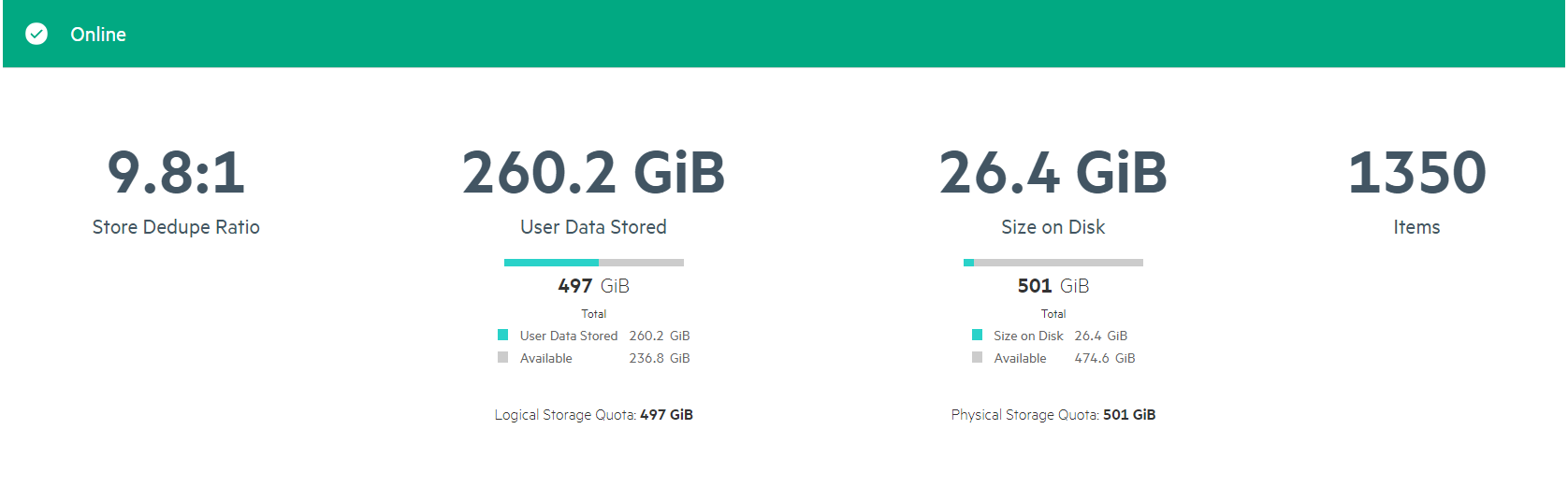
I also think the COmpression ratios i am getting are pretty awesome too! So not am I only saving bandwidth across the network by deduping the data before it’s sent but when it lands im getting decent compression ratios aswell to make sure my LTR copies take up as little space as possible.

I have also created a CIFS share for LTR indexing so all my data is on a single appliance and super easy to use as well to.

Thanks for reading

Feel free to comment and share

Cheers

Chris