Zerto Migrations – Between Storage Systems

Are you considering migrating your data from one storage product to another? It can be a daunting task, but with the right tools and strategy, it can be done smoothly and with minimal disruption. One of the most popular tools for data migration is Zerto.

Zerto is a software-based platform that specializes in disaster recovery, backup, and migration of data across different storage products. It works by creating replicas of your data and applications and transferring them to the target storage environment. This process ensures that your data remains intact and fully accessible during the migration process.

Migrating between storage products can be challenging, especially if you are dealing with different vendors, hardware, and software. Zerto simplifies the process by providing a comprehensive solution that is completely storage agnostic !

One of the most significant advantages of using Zerto for data migration is its ability to perform the migration while the source environment is still in use. This means that you can continue to access and use your data and applications throughout the migration process, without any downtime or disruption.

Zerto also provides a variety of features that make it an ideal choice for data migration. These include:

  1. Continuous Data Protection (CDP): Zerto’s CDP feature ensures that your data is always protected, even during the migration process. It replicates data at the block level and transfers it to the target environment in real-time, meaning your migrations window is only minutes.
  2. Point-in-Time Recovery: Zerto allows you to recover your data to any point in time, making it easy to roll back to a previous state in case of any issues during the migration process.
  3. Zero RPO – Using built in workflows specifically designed for migrations ensures there is NO DATA LOSS during a migration.
  4. Automated Testing: Zerto automatically tests the migrated data and applications to ensure that they are fully functional and operational in the target environment, this can be done with only 4 clicks and can be carried out as many times before the migration as you like as it is completely non-disruptive to production workloads.

In conclusion, if you are planning to migrate your data between different storage products, Zerto can be an excellent tool to simplify the process and minimize downtime. Its ability to replicate data in real-time, its point-in-time recovery feature, and its support for a wide range of storage products make it a powerful solution for data migration.
The Impact of Isolated Recovery Environments on Disaster Recovery and Ransomware Protection

Introduction

Ransomware attacks have become a significant threat to businesses, causing extensive damage and financial loss. 61% or DR responses triggered last year were due to ransomware. To mitigate this risk, companies have been implementing various security measures, including the use of isolated recovery environments. In this article, we will discuss how isolated recovery environments positively impact disaster recovery and ransomware protection.

What are Isolated Recovery Environments or Clean Rooms?

Isolated recovery environments are separate, secure spaces where businesses can store critical data copies. These environments are isolated from the organization’s primary IT infrastructure to prevent malware or ransomware from infecting the backup data. The isolation ensures that businesses have a reliable method to recover data and protect it from any disaster or ransomware attack.

How Do Isolated Recovery Environments Help Combat Ransomware and Disaster Recovery?

Ransomware attacks encrypt critical files, making them inaccessible until a ransom is paid. If businesses have data copies stored in an isolated recovery environment, they can quickly recover lost data without paying the ransom. it goes without saying the more copies of data you have the better the RPO and the quicker you can recover with tools such as orchestration and automation the better your RTO will be. The data is stored in an immutable format making it immune to ransomware attacks that infect the primary IT infrastructure.

Benefits of Isolated Recovery Environments

Isolated recovery environments offer multiple benefits to businesses beyond protecting against ransomware. They provide peace of mind, knowing that critical data is safe and recoverable in the event of a disaster. Moreover, they enable businesses to recover from any data loss event, whether accidental or caused by a disaster. They can also be helpful when looking at overall cyber-resilience measures and security posture especially when looking at cyber insurance, many providers will mandate the use of a clean room before providing quotes.

Conclusion

In conclusion, ransomware attacks pose significant risks to businesses worldwide. Isolated recovery environments provide an effective solution for protecting against ransomware attacks and enabling streamlined disaster recovery processes. They ensure that businesses can quickly recover from any data loss event and resume operations with minimal downtime. By implementing isolated recovery environments, businesses can protect themselves from ransomware attacks and mitigate the impact of any disaster.

Zerto Certified Associate Exam

The Training Team At Zerto has redesigned and relaunched the all-new Zerto Certified Associate (ZCA) qualification.  The ZCA is a training and certification program designed to help IT professionals understand the fundamentals of disaster recovery and data protection utilising the Zerto solution. This course is perfect for those who want to specialize in the field of business continuity and disaster recovery or for those who want to gain a better understanding of Zerto’s disaster recovery software.

The ZCA program consists of an online, self-paced course that covers the basics of Zerto’s disaster recovery software, including how to install, configure, and manage Zerto. The course is broken down into several modules, each covering a different aspect of ZVR. The modules include:

  1. Overview– This module provides an overview of Zerto’s disaster recovery software, including its features and benefits.
  2. Customer challenges – This module covers the current challenges market challenges
  3. Zerto Use Cases – this covers the various use cases Zerto can be used for
  4. How Zerto Technology Solves Customer Challenges – learn how to utilize the use cases above the solve the customer challenges we learned about earlier
  5. Business Value – learn how Zerto drives business value throughout organisations of all sizes
  6. The Zerto Interface – get a hands-on view of what Zerto looks like and how you would go about certain operations inside of the application.
  7. Resources – find loads of additional resources to help guide you on your learning journey with Zerto and even try it out in our Hands-On Labs!

Once you complete the online course, you will need to pass a certification exam to become a ZCA. The exam is online and consists of 20 multiple-choice questions. You will have 60 minutes to complete the exam.

I’ve just taken it and I am blown away by how good it is ! and even I learned something new taking the course!

The best bit is it’s 100% completely free!

Zerto now supports UEFI in AWS

Zerto, the industry leader in cloud data management and protection, has recently announced that it now supports Amazon Web Services (AWS) UEFI. This exciting news means that Zerto users can now enjoy even more flexibility and choice when it comes to running their workloads on AWS.

UEFI, or Unified Extensible Firmware Interface, is a modern firmware interface that provides a number of benefits over traditional BIOS firmware. It is faster, more secure, and more flexible than BIOS, making it an increasingly popular choice for modern systems. However, until recently, Zerto did not support UEFI, which limited the options for users who preferred or required this interface.

Now, with Zerto 9.7 bringing support for AWS UEFI, users can take advantage of all the benefits of this interface without any limitations. They can confidently run their workloads on AWS, knowing that their systems are fully supported and compatible with the latest firmware technologies.

Zerto’s support for AWS UEFI is just the latest example of the company’s commitment to providing its users with the most innovative and advanced technologies. Whether you are looking to protect your data in the cloud, move workloads to the cloud, or simply manage your data more efficiently, Zerto has the tools and expertise you need to succeed.

So, if you are an existing Zerto user or completely new to Zerto , and is looking to take advantage of AWS’s powerful cloud platform, now is the perfect time to explore your options. With Zerto’s support for AWS UEFI, you can rest assured that your systems will be fully supported and compatible with the latest firmware technologies. So why wait? Start exploring your options today and see how Zerto can help you take your data management and protection to the next level.

What is Zerto Backup for SaaS

The title is pretty self explanatory really, I’m going to run through what Zerto Backup for SaaS is, how it works and some of the advantages I see of using it.

The What?

Well the naming of the product couldn’t be more explanatory really, it is Zerto’s offering for backing up your SaaS Data, very simple and easy to understand, no codename or fancy marketing titles, simply put backup your SaaS data with Zerto!

The Why?

As most of use use SaaS applications on a daily basis in our work environments and personal lives, it easy to forget that some of our most critical data sits inside of these SaaS applications. But surely Microsoft are backing up my data for me inside of my company email? The short answer… No,  Microsoft advises, “We recommend that you regularly backup Your Content and Data that you store on the Services or store using Third-Party Apps and Services”. This is also true of Gartner and Forrester, aswell as data regulatory laws such as GDPR. Having an independant copy of your data outside of the provider can give many benefits, but data security and data availability are the two main reasons to choose an independant 3rd party provider.

The How?

Zerto Backup for SaaS is powered by KeepIT, a leading provider in SaaS data protection therefore Zerto automatically becomes a prominent figure in this space by adopting industry leading technology as its foundation. Zerto Backup for SaaS offers users a simple way to backup, store and protect SaaS data, utilising a cloud to cloud model,

Zerto backup for SaaS stores data in the only cloud that is purpose built, designed and dedicated to SaaS data protection. This means storing a copy outside of any hyperscale public cloud such as AWS or Azure, which automatically guarantees that your live data is not sat in the same cloud as your Backup data.

Being SaaS to SaaS data protection offers many advantages, you dont need to run any additional infrastructure or manage any capacity or storage outside of the Zerto Backup for SaaS offering, this means complexity is minimal, capacity planning is non existent, storage and egress charges do not apply, and no longer to do organisations needs ot balance cost, retention and compliance, all 3 can be kept in check.

The Wow

Here are some of the key major benefits to using Zerto backup For SaaS.

  • Unlimited Retentions – store as much data for as long as you want included in a per seat price
  • Simple Pricing Model – Simply pay per user per month, no additonal costs or hidden fees such as storage, infrastructure or egress
  • Preview Everything – See what your planning to restore before you restore it, saving time and copies of data restored that are not right.
  • Comprehensive Coverage – One of the deepest and widest protection on the market for SaaS data
    • Micrososft 365
    • Salesforce
    • Google Workspace
    • Microsoft Dynamics 365
    • Azure Active Directory (Free)
    • ZenDesk

Summary

I know this is a very high level overview and some thoughts on the overall product itself, but I am going to be sharing more and more on Zerto Backup for SaaS in the future so keep an eye out for more detailed content coming soon.

Introducing Zerto 9.5 – Part 3

Immutability and Offsite Repository Additions

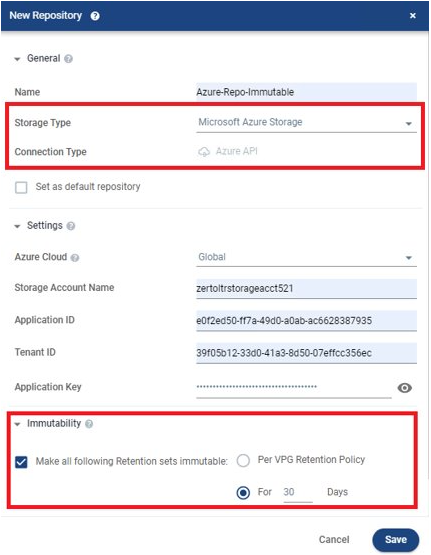
Azure Storage Account Immutability

With the astronomic rise of ransomware attacks, organizations are being even more wary about where and how they store copies of their data for recovery purposes, as many of you may know already Zerto supports a wide variety of storage platforms for its offsite repository or “Long Term Retention” feature, these include Amazon S3, Azure Storage Accounts Purpose Built backup targets such as HPE Storonce, Exagrid etc, NFS & SMB and S3 compatible storage such as Cloudian, this gives customer ultimate flexibility when choosing a suitable repository for their needs. up until recently Amazon S3 is the only supported place for immutable copies to be stored, in an updated to version 9.0 Zerto released the support for S3 Compatible systems to also be able to use the immutable feature inside of Zerto, this allows to organisations to use on-premises s3 repositories aswell as cloud based ones with immutability, and now as of version 9.5, Microsoft Azure Storage Accounts are now supported for immutability aswell, this growing list shows the dedication Zerto has to offering true choice and flexibility when it comes to choosing not only production storage, hypervisors or even whole cloud environments but also where you choose to store immutable copies of the your data aswell.

I think this is huge news, Azure is one of if not the biggest cloud provider in the world so being able to support customers wanting to store data in an immutable format in Azure can only be a good thing.

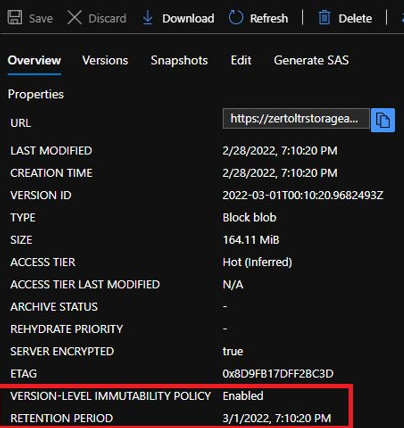
Zerto leverages the “versioning” options inside of the Azure Storage Accounts to ensure immutable copies cannot be deleted or tampered with once stored, Zerto then creates its own containers of data and metadata in a unique way for Zerto to understand the immutability function.

users can verify if the files are immutable in the Azure portal, by browsing the storage and looking for the field “Version-level Immutable Policy” – this will show either enabled or disabled.

More from Zerto 9.5 to come soon!

Thanks for Reading

Chris

Introducing Zerto 9.5 – Part 2

Independant Scratch Journal Settings

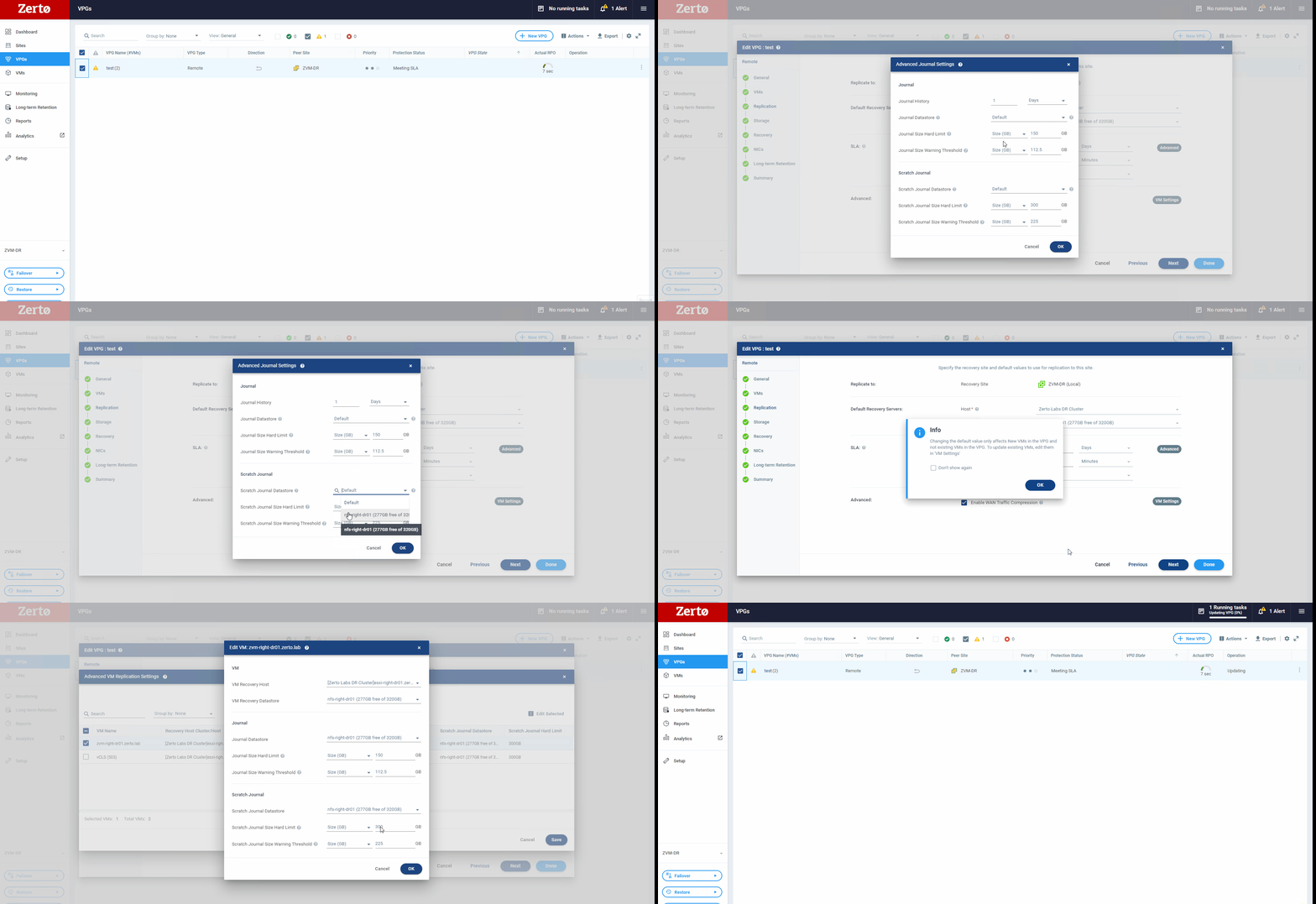
Thanks for reading the second part of this blog all about Zerto 9.5, in this post in going to look at another great feature Zerto has released, the ability to split out journal volumes and scratch volumes settings.

So for people who are newer to Zerto, what is a scratch volume and what does it do? Well a scratch volume is used inside of the Zerto solution to provide a temporary place for data to be written during operations such as a failover test, allowing users to perform any type of validation on their instantly available copy that zerto has spun up. The scratch volume is used in most of Zerto’s recovery operations, it allows for simple rollbacks from live failovers or move operations by ensuring. until a failover or move is committed any writes made are written to the scratch volume and not overwriting production data, if a rollback is triggered then the scratch volume simply gets removed and Zerto’s automation and orchestration kicks in to clean up and rollback recovery as if nothing ever happened.

So why is separating these settings good news? well historically, the scratch volume settings were directly tied to the journal volume settings, so parameters such as datastore location and maximum size were identical to that of the journal volume, this means that extra planning had to be made during extended failover tests or to make sure the underlying data store had enough free capacity for the scratch volume to write into.

Now there is separation between these two objects inside of the Zerto solution, users are now able to specify a different datastore – therefore a potentially different class or type of storage SSD over HDD for example, and also specify different hard limits to that of the journal, this is incredibly useful if a user wants to run a failover test for an extended period this allows them to create a scratch volume far larger than before to extend the period of time a failover test can last.

This setting is located inside the VPG settings so can be customised on a per VPG basis and on a per VM basis giving an mazing amount of flexibility.

That is all from Part 2, Keep an eye out for the next instalment which will be along soon

Thanks for Reading

Chris

Introducing Zerto 9.5 – Part 1

No Sync Feature

I’m going to write a short series on Newly released Features hat make up the Zerto 9.5 release

Once I have experienced the new features a little more I will do a second series deep diving some of the new features and functionality inside Zerto 9.5

As a long time Zerto user I am going to show some of the features that may not be headline items but will make a difference to Zerto users everywhere!

Exclude Disk from Replication

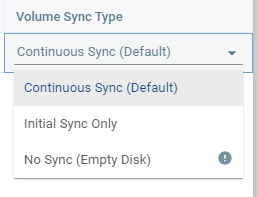
Previously inside Zerto, there was a concept of a “temp” disk, this would only sync once and then not participate in CDP after the initial sync was complete, this was great however if your Temp disk was 2TB in size not only did the initial sync take extra time to complete but also took up storage space at the DR site. With Zerto 9.5 users now have the option to select one of three options for each disk attached to a VM being replicated by Zerto

  • Continuous Sync (Default) – this will be the most popular options as it means all data on the disk will be continuously replicated
  • Initial Sync Only – Disks will only undergo an initial sync and then opt out of CDP after.
  • No Sync – this option is brand new and allows disks to be completely removed from all sync activities including initial sync.

The No Sync option will add flexibility and agility to people Zerto deployments and will no longer have initial sync times longer than necessary and no longer be storing data they never intend to use for DR or Ransomware Recovery. upon recovery an empty disk will be attached to the VM of the correct size.

Please look out for the next post in this series which will cover another new feature in Zerto 9.5

Thanks

Chris

Zerto Launches Instructor Led Training!

For the first time in Zerto’s history customers, partners and prospects are now able to gain valuable expertise and knowledge in the Zerto solution from a qualified instructor.

Managing Zerto: Setup,Protection, and Recovery is the title of the course which is aimed at all experience levels looking to solidify their zerto knowledge to makes sure they are using Zerto’s powerful solution to the best of its ability and solving for all use cases.

During the class there are labs that students will complete to solidify their conceptual knowledge they will have learned from the instructor and students can even show the value of Zerto by recovering from ransomware within minutes, to seconds before an attack.

To find out more visit: https://education.hpe.com/us/en/training/portfolio/zerto.html

DR at Scale in AWS – The Zerto Way

Last week i had the pleasure of attending AWS Re-Invent in Vegas, I spoke to a lot of people and it reminded me of how much I have missed these type of events recently!

I had the pleasure of speaking to some of Zerto’s customers who are already achieving their DR or migration goals utilizing Zerto and AWS. So Logically the NExt question was – what’s next from Zerto? i spent most of my week talking about the new product announcement – Zerto In-Cloud for AWS – Disaster Recovery at Scale for EC2 instances!

Lets take a look at some of the key highlights before my next blog which will be a deeper dive.

  • Scalable DR – No agents to manage ! i think this is huge because everyone know as you scale managing agents across 1000 EC2 instances is no easy task
  • Purpose built for AWS – A complete re-design and new In-Cloud Appliance makes Zerto In-Cloud incredibly efficient and cost effective
  • Cross Region, Availability Zone and Account – Giving customers ultimate choice and flexibility in their DR – Not just pre-approved paired zones!
  • Configurable RPO – This is a first for Zerto allowing customer to choose the desired RPO on a VPG by VPG basis.
  • Advanced Analytics – From day 1 Zerto In-Cloud will show all analytical data in its SaaS platform Zerto Analytics for greater visibility and control over your entire hybrid/public cloud estate

That’s is all i can think of off the top of my head, i will be doing a follow up to this to go over some of the technical parts in more detail so keep an eye out for that one in the near future.

Feel free to get in touch if you would like to know more!

Cheers

Chris