Title: Safeguarding Your Digital Identity: The Importance of Backing Up Azure AD

Introduction: In today’s digital landscape, where organizations rely heavily on cloud-based services, safeguarding critical data and ensuring business continuity is of paramount importance. Azure Active Directory (Azure AD) plays a crucial role as the identity and access management platform for Microsoft cloud services. In this blog post, we will explore why backing up Azure AD is incredibly important and how it can help protect your organization’s digital identity.

  1. Preserving User Identity and Data: Azure AD serves as the central repository for user identities, security groups, and access policies within the Azure ecosystem. By backing up Azure AD, you can safeguard critical user information, including account settings, permissions, and group memberships. This ensures that in the event of accidental deletions, malicious activities, or system failures, you can recover and restore user identities and associated data swiftly.
  2. Mitigating Security Risks: Securing your organization’s digital identity is crucial in today’s threat landscape. Backing up Azure AD helps mitigate security risks by enabling you to roll back to a known good state in case of security breaches, unauthorized access, or data corruption. With a reliable backup solution, you can restore compromised identities and minimize the potential impact of security incidents.
  3. Ensuring Business Continuity: Azure AD is the backbone of many organizations’ cloud infrastructure, providing access to critical resources, applications, and services. A failure or data loss in Azure AD can severely impact business operations and productivity. By regularly backing up Azure AD, you can ensure business continuity by quickly recovering user identities and access controls, minimizing downtime, and maintaining seamless access to vital resources.
  4. Simplifying Compliance and Auditing: Compliance with industry regulations and data protection laws is a top priority for organizations across various sectors. Backing up Azure AD helps simplify compliance efforts by retaining historical records of user identities, group memberships, and access policies. This enables accurate auditing, ensuring that you can provide evidence of proper controls and access management when required.
  5. Streamlining Disaster Recovery: Disasters can strike unexpectedly, ranging from hardware failures to natural disasters. A robust Azure AD backup strategy ensures you are prepared for such scenarios. With regular backups, you can restore Azure AD data quickly, reducing recovery time and ensuring a smoother recovery process. This capability is vital for organizations aiming to minimize the impact of unforeseen events and swiftly restore critical services.

Conclusion: As Azure AD continues to be the foundation for secure access and identity management in the Microsoft cloud ecosystem, backing up Azure AD becomes an essential component of a comprehensive data protection strategy. By preserving user identities, mitigating security risks, ensuring business continuity, simplifying compliance, and streamlining disaster recovery, backing up Azure AD helps safeguard your organization’s digital identity and ensures uninterrupted access to critical resources. Invest in a reliable Azure AD backup solution today and gain peace of mind knowing that your digital identity is secure, recoverable, and protected.
Zerto Long Term Retention with HPE Cloud Volumes

Hi All, today I am going to attempt to set up HPE Cloud Volumes as a repo for Zerto to store its Long Term Retention data. this is something completely new to me so hopefully we can all learn something on the way.

so let’s look at the steps needed to create the backup store and connect it to Zerto.

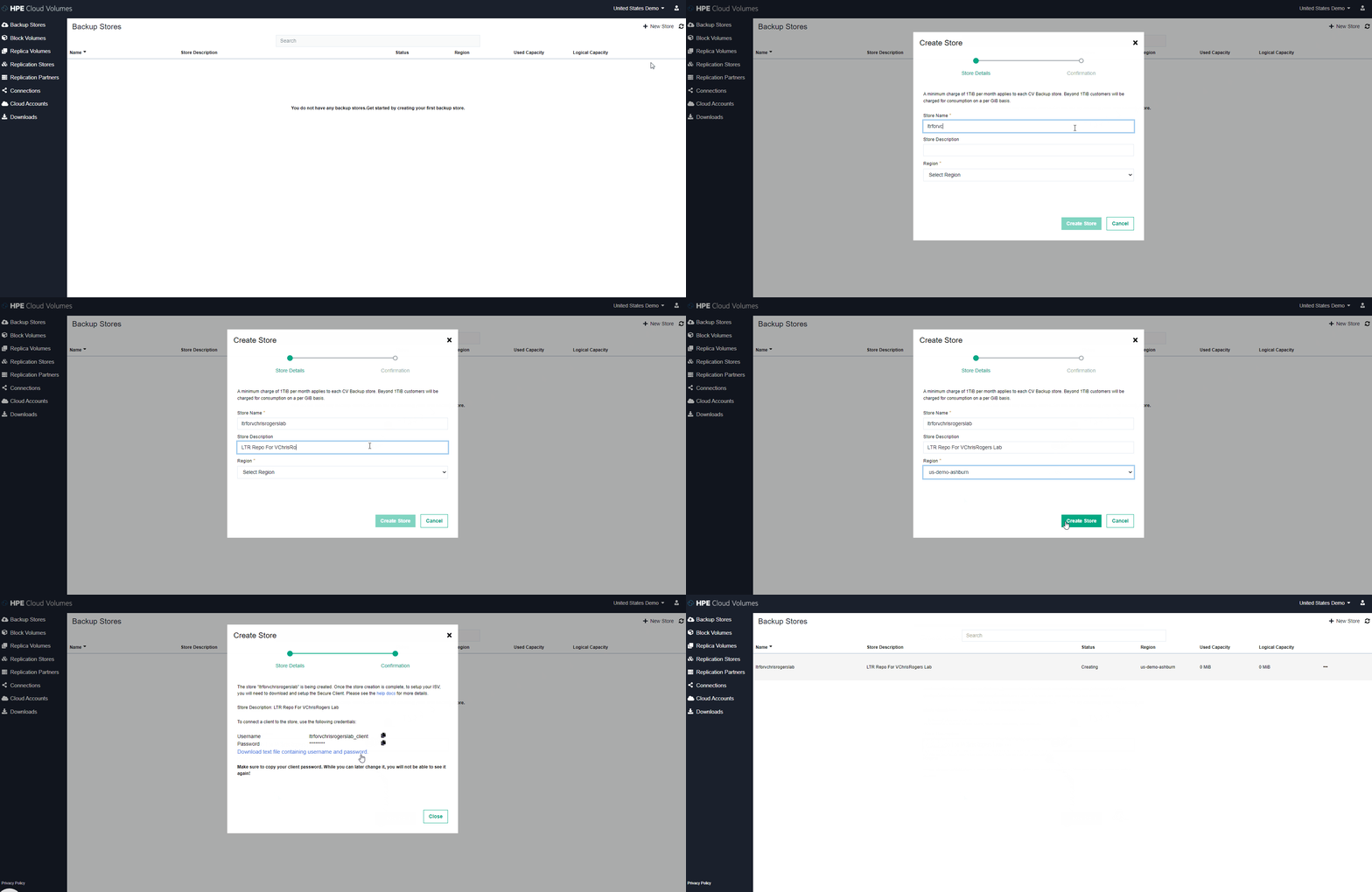
  1. Create backup store inside HPE Cloud Volumes

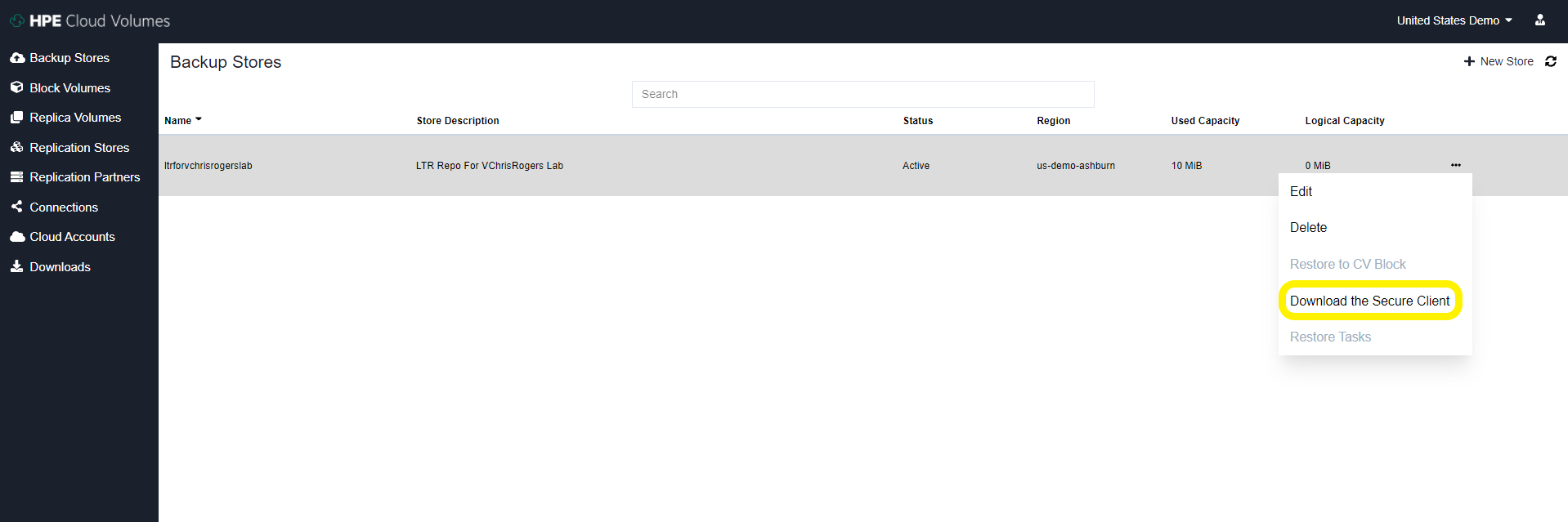
2. download the secure client from the options tab on the store we just created

3. Apply config to secure client server On-Prem – I used the official documentation from HPE to do this : https://docs.cloudvolumes.hpe.com/help/kts1584136344568/

I deployed an Ubuntu 20 VM and with my rather limited Linux skills I did manage to configure the secure client service correctly and get it running.

I did have a couple of issues along the way, most likely the issue stemmed from me not reading things properly (I think we have all been there) issues I had are: In the secure_client_config.yaml file I had to change the paths to absolute paths for the files and i have to change the ownership of the files to the user i was running thes service as, again probably just my poor linux knowledge shining through

# Certificate path for CDS signing authority
ca: /opt/cloudvolumes/ca.crt

# Client certificate issued by CDS to customer
cert: /opt/cloudvolumes/client.crt

# Client key issued by CDS to customer
key: /opt/cloudvolumes/client.key

# CBS public endpoint address
target1: demo-us-ashburn-1.cloudvolumes.hpe.com:9387
target2: demo-us-ashburn-1.cloudvolumes.hpe.com:9388

# Local ports to listen upon
source1: 0.0.0.0:9387
source2: 0.0.0.0:9388

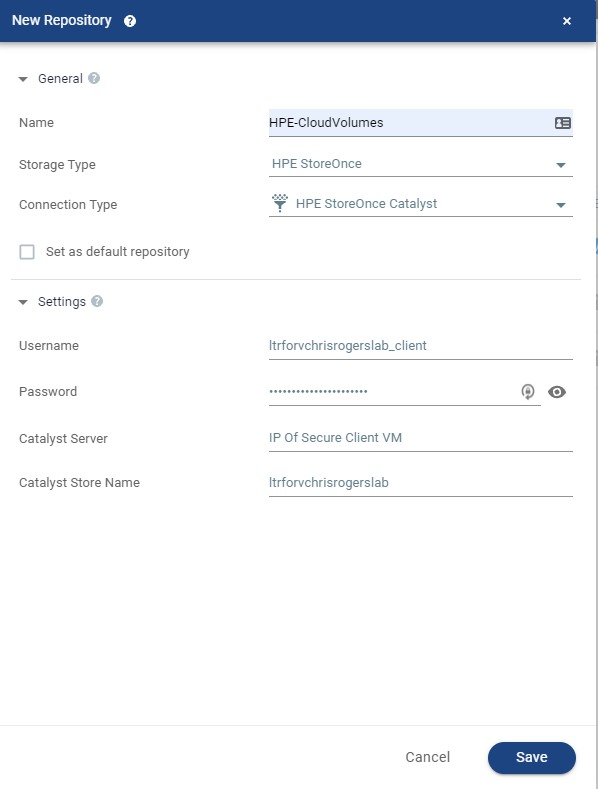
4. Once this service has started and all look good inside the VM you can now add the Repo to Zerto in the exact same way that you would add a HPE Catalyst Store from a StoreOnce Appliance – The credentials used are the ones you downloaded from the HPE Cloud Volumes page earlier on.

5. Once this is added you will see it appear as a Catalyst store inside the Zerto UI and now this is enabled for Zerto to store LTR copies on

Now all we have to do is configure a VPG to utilise LTR and send some snapshot free backups to the cloud!

I know this wasn’t particularly in depth but honestly it’s super easy to configure as are most things within Zerto.

This is a great use case for getting your data offsite but not having to pay egress charges etc – another way Zerto and HPE work amazingly well together.

Thanks for reading everyone

feel free to comment and share

Cheers

Chris

Long Term Retention with HPE StoreOnce

Hey All

I just wanted to run people by what I am using for my Long Term Retention Repo in my home lab.

I am using the HPE StoreOnce Virtual Appliance to store my long term retention copies from Zerto on – simply this is a an OVF appliance that i’ve deployed into my environment and have attached some local disks to for capacity – ive got around 1TB of usable space to consume.

the reason why I chose this appliance instead of a Generic NFS/SMB or S3 compatible is that Zerto has tight integration with HPE Catalyst API, this actually runs inside of each and every VRA Zerto deploys. So what does this mean, well…

  • We can add Catalyst Stores natively from the Zerto UI
  • Zerto will change the data structure of its LTR Copies to make sure its is perfectly suited to HPE Catalyst Store
  • Source Side Deduplication via the Catalyst API
  • Automatically optimize multiple streams without overloading StoreOnce
  • Automatically manage the repository lifecycle and perform garbage collection

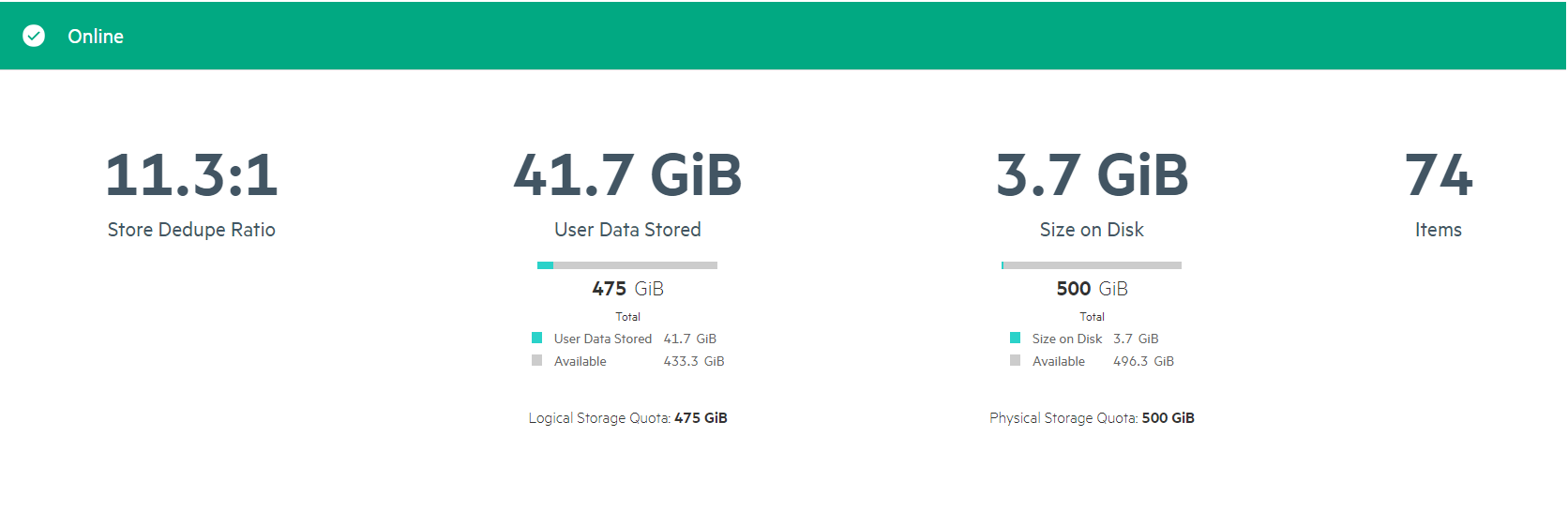
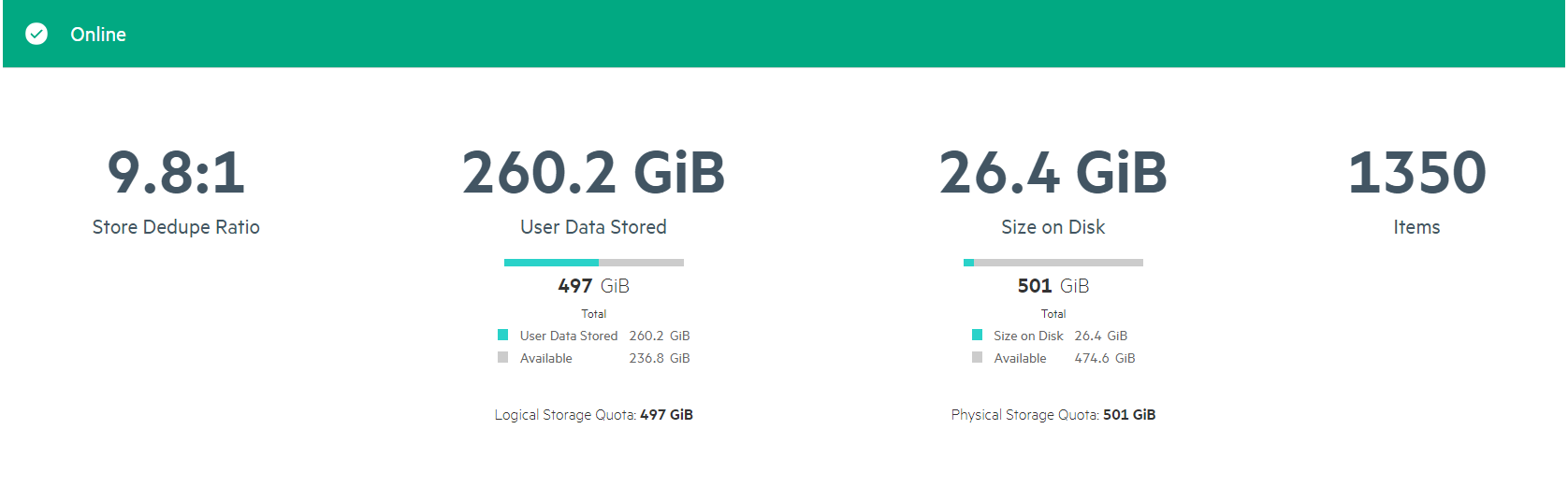
I also think the COmpression ratios i am getting are pretty awesome too! So not am I only saving bandwidth across the network by deduping the data before it’s sent but when it lands im getting decent compression ratios aswell to make sure my LTR copies take up as little space as possible.

I have also created a CIFS share for LTR indexing so all my data is on a single appliance and super easy to use as well to.

Thanks for reading

Feel free to comment and share

Cheers

Chris

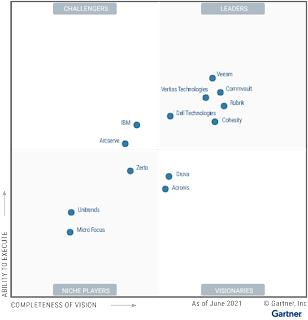
Zerto’s First Appearance in the Gartner Enterprise Backup & Recovery MQ!

    Zerto reached a huge milestone in its history by making it into the Gartner MQ for Backup and Recovery for the first time. in my opinion this is a huge step as Zerto has its roots in the Disaster Recovery Sector. I believe this is even more significant as the MQ placement was evaluated before some key announcements from Zerto, lets dig into some of these

  • Zerto for SaaS Powered by Keepit – Powerful SaaS Backups for Microsoft 365, Google Workspaces, Salesforce and More! all delivered in an easy to use SaaS platform that requires no infrastructure, no additional storage (even public cloud storage) and some amazing recovery workflows 

  • Zerto for Kubernetes (Z4K) – the worlds best CDP engine dropped into the worlds best container orchestration platform, in my opinion a match made in heaven. allowing customers to achieve data protection-as-code, so Kubernetes workloads are born protected, and protected every 5 or so seconds with the same granularity that Zerto customers have come to expect from Zerto’s CDP engine for VM’s

  • Zerto 9 – In my opinion one of the biggest releases in Zerto’s history. Loads of new features & functionality including but no limited to:
  • Immutability for backups
  • File level recovery from LTR repositories
  • Instant VM restore into production 
  • S3 compatible repositories now supported 
  • Cloud storage automated tiering 
  • Automated VM protection                                                             

 watch the release webinar here:
https://www.zerto.com/page/zerto-9-demo-instant-ransomware-recovery/ 

    When we take all of these things into account I truly think that Zerto has a great future disrupting the backup market and making sure CDP is the best protection against things like ransomware.
More to come on the above features in future posts

Please comment, or share so others are also aware. 

Thanks for reading 

Chris